Unlocking the Potential of a Distressed Striped SVG Bundle for Retro Designs
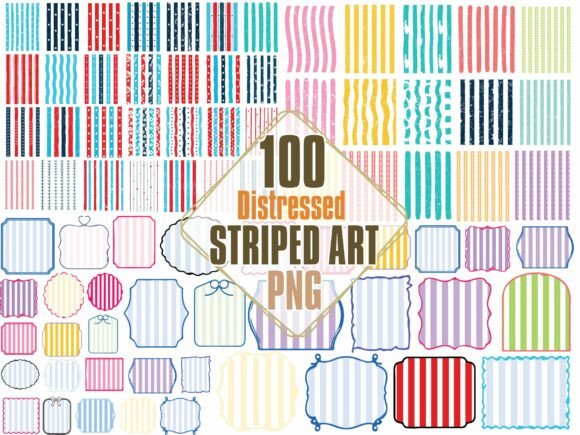
There is a distinct charm in the worn, textured look of vintage graphics that modern flat design simply cannot replicate. When you incorporate a Distressed Striped SVG Bundle into your workflow, you are tapping into a aesthetic that feels lived-in, authentic, and effortlessly cool. These collections, often featuring over 100 unique designs including retro stripe frames, labels, and background patterns, are essential tools for anyone looking to elevate sublimation projects, apparel graphics, or DIY crafts. However, diving into the world of distressed textures requires more than just downloading a file and hitting print. Many creators, from hobbyists to small business owners, often overlook critical details regarding file formats, resolution, and application methods, leading to frustrating results that lack that professional vintage punch.
Understanding the True Value of Vintage Texture
The primary appeal of a distressed stripe bundle lies in its ability to add depth and character instantly. Unlike standard geometric stripes which can feel sterile, distressed patterns mimic the imperfections of old screen prints, faded fabric, and weathered paper. This "grunge" effect is what makes designs suitable for trending retro branding and modern farmhouse decor. Yet, a common misunderstanding arises when users assume all "distressed" files are created equal. Some bundles offer low-resolution PNGs that look pixelated when scaled up, while others provide vector SVGs that retain crisp edges even when the texture itself is intentionally rough. Knowing the difference is vital for maintaining quality across different mediums, from small stickers to large t-shirt prints.
Mistake #1: Ignoring File Format Compatibility
One of the most frequent errors creators make is purchasing a bundle without verifying the included file formats against their specific hardware and software needs. A comprehensive bundle should ideally include SVG, EPS, DXF, and high-resolution PNG files. If you are using a Cricut or Silhouette for cutting vinyl decals, the SVG or DXF format is non-negotiable for clean cut lines. Conversely, if your primary goal is sublimation printing onto mugs or polyester shirts, you need high-quality PNGs with transparent backgrounds at 300 DPI.
The Consequence: Using a raster PNG for a vinyl cut project often results in jagged edges and excessive weeding time, as the machine tries to cut around every tiny noise pixel in the distress texture. On the flip side, trying to scale a low-res image for a large backdrop leads to blurry, unprofessional output.
The Better Approach: Before downloading or buying, audit your current projects. If you do both cutting and printing, ensure the striped svg bundle you choose explicitly lists multi-format support. Always test one file from the free preview (if available) in your design software to ensure the layers separate correctly for cutting or that the transparency holds up for printing.
Mistake #2: Overlooking Commercial Use Rights
In the excitement of finding a massive collection of 100 designs, many entrepreneurs skip reading the license agreement. This is a dangerous oversight for anyone planning to sell physical goods like t-shirts, invitations, or branded merchandise. Not all "commercial use" licenses are identical; some restrict the number of physical sales, while others prohibit using the assets in digital templates or print-on-demand services where the customer downloads the design.
The Consequence: Utilizing assets beyond the scope of the license can lead to copyright strikes, account bans on marketplaces like Etsy or Amazon Merch, and potential legal issues. It undermines the credibility of your brand and can result in financial loss.
The Better Approach: Treat the license file with the same importance as the design files themselves. Look for clear language stating "Unlimited Commercial Use" if you plan to scale your business. If the terms are vague, reach out to the creator for clarification before integrating the vintage stripe patterns into products intended for sale.
Mistake #3: Misapplying Distressed Textures on Dark Fabrics
Aesthetic failure often occurs not because of the design, but because of the substrate. Distressed designs rely heavily on contrast. The "worn" look is created by gaps in the ink or color. When applying a retro stripe png with a transparent background directly onto a dark-colored garment using standard sublimation or light vinyl, the distress marks often disappear, leaving a solid block of color that loses its vintage intent.
The Consequence: Your carefully selected striped background png ends up looking like a mistake or a solid shape, ruining the retro vibe you aimed for. The design fails to communicate the intended style, leading to wasted materials and disappointed customers.
The Better Approach: For dark fabrics, consider using heat transfer vinyl (HTV) where the distress is physically cut out, allowing the shirt color to show through the gaps. Alternatively, if sublimating, ensure you are printing on white or light-colored blanks, or use a white underbase layer if your printing method supports it. Always mock up your design on the actual color of the product you intend to sell to verify visibility.
Maximizing Efficiency with Layered Files
Professional designers know that time is money. A high-quality stripe clipart bundle should offer organized layers. A common frustration is receiving flattened files where the frame, the label, and the stripe pattern are merged into a single image. This makes customization impossible. If a client wants a monogram inside a striped frame svg but the frame is locked to a specific background color, you are forced to recreate the element from scratch.
To avoid this inefficiency, prioritize bundles that advertise "editable layers" or provide source files in formats like EPS or AI alongside the SVGs. This allows you to swap colors, resize individual elements, and insert text seamlessly. For instance, changing a navy blue retro stripe to a muted mustard yellow to match a brand palette should take seconds, not hours.
Final Checks Before You Create
Before finalizing your purchase or starting your next project, take a moment to evaluate the versatility of the Distressed Striped SVG Bundle. Does it offer enough variety to prevent your shop from looking repetitive? With 100 designs, you should have options for horizontal stripes, vertical patterns, diagonal accents, and circular frames. Check if the distress level varies; some projects need heavy grunge, while others require a subtle wear.
Remember, the goal is to enhance your creative output, not complicate it. By choosing the right formats, respecting licensing terms, and understanding how textures interact with different materials, you transform a simple download into a powerful asset for your business. Whether you are crafting scrapbooking layouts, designing invitations, or building a retro branding identity, these details ensure your final product looks intentional, high-quality, and uniquely yours.